> ## Documentation Index
> Fetch the complete documentation index at: https://help.wtpbiz.com/llms.txt
> Use this file to discover all available pages before exploring further.
# Pricing
> Subscription plans and pricing for Photo Frame Customizer
## Pricing Plans
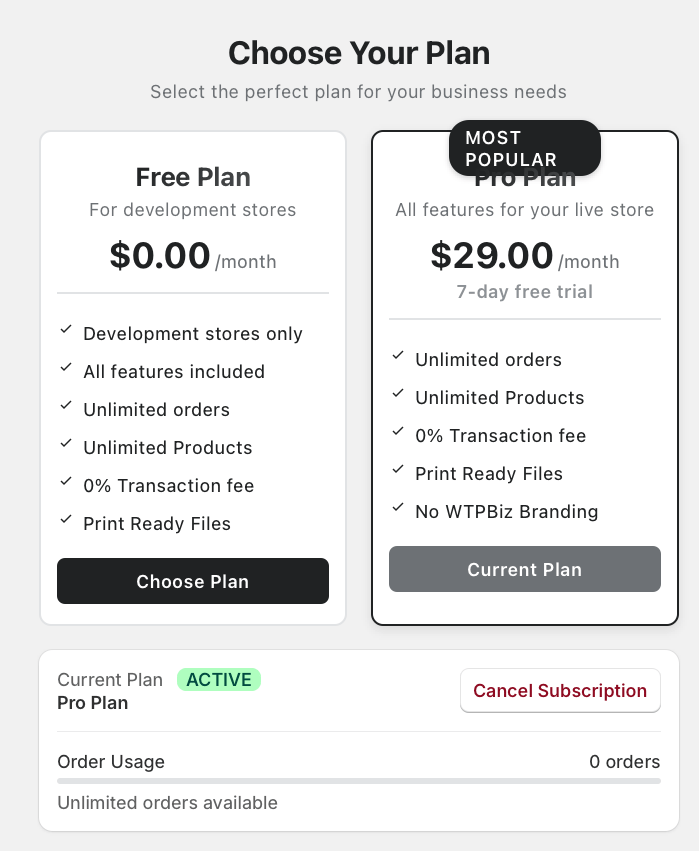 Photo Frame Customizer is available as a subscription from the Shopify App Store. Pricing is structured to suit stores of all sizes.
## Available Plans
Visit the app listing on the Shopify App Store to see current pricing:
[https://apps.shopify.com/photo-frame-customizer](https://apps.shopify.com/photo-frame-customizer)
Plans typically include:
* **Free Trial** — A limited trial period so you can test the app before committing to a subscription.
* **Basic Plan** — Core frame customization features for growing stores.
* **Pro Plan** — Advanced features including AI Portraits, more frame styles, and priority support.
## What's Included
All plans include:
* Frame, size, and color configuration
* Customer-facing customizer widget
* Photo upload and preview
* Shopify theme integration
* Standard support
Pro plans additionally include:
* AI Portrait generation (Fal.ai integration)
* Photo effects and filters
* Advanced customization options
## Managing Your Subscription
1. In your Shopify admin, go to **Apps > Photo Frame Customizer**.
2. Click on **Billing** or **Subscription** to view or change your plan.
3. You can upgrade, downgrade, or cancel at any time.
Pricing and plan features may change. Always refer to the [Shopify App Store listing](https://apps.shopify.com/photo-frame-customizer) for the most current pricing information.
Photo Frame Customizer is available as a subscription from the Shopify App Store. Pricing is structured to suit stores of all sizes.
## Available Plans
Visit the app listing on the Shopify App Store to see current pricing:
[https://apps.shopify.com/photo-frame-customizer](https://apps.shopify.com/photo-frame-customizer)
Plans typically include:
* **Free Trial** — A limited trial period so you can test the app before committing to a subscription.
* **Basic Plan** — Core frame customization features for growing stores.
* **Pro Plan** — Advanced features including AI Portraits, more frame styles, and priority support.
## What's Included
All plans include:
* Frame, size, and color configuration
* Customer-facing customizer widget
* Photo upload and preview
* Shopify theme integration
* Standard support
Pro plans additionally include:
* AI Portrait generation (Fal.ai integration)
* Photo effects and filters
* Advanced customization options
## Managing Your Subscription
1. In your Shopify admin, go to **Apps > Photo Frame Customizer**.
2. Click on **Billing** or **Subscription** to view or change your plan.
3. You can upgrade, downgrade, or cancel at any time.
Pricing and plan features may change. Always refer to the [Shopify App Store listing](https://apps.shopify.com/photo-frame-customizer) for the most current pricing information.