> ## Documentation Index
> Fetch the complete documentation index at: https://help.wtpbiz.com/llms.txt
> Use this file to discover all available pages before exploring further.
# Effects
> Apply photo effects and filters in Photo Frame Customizer
## Effects Overview
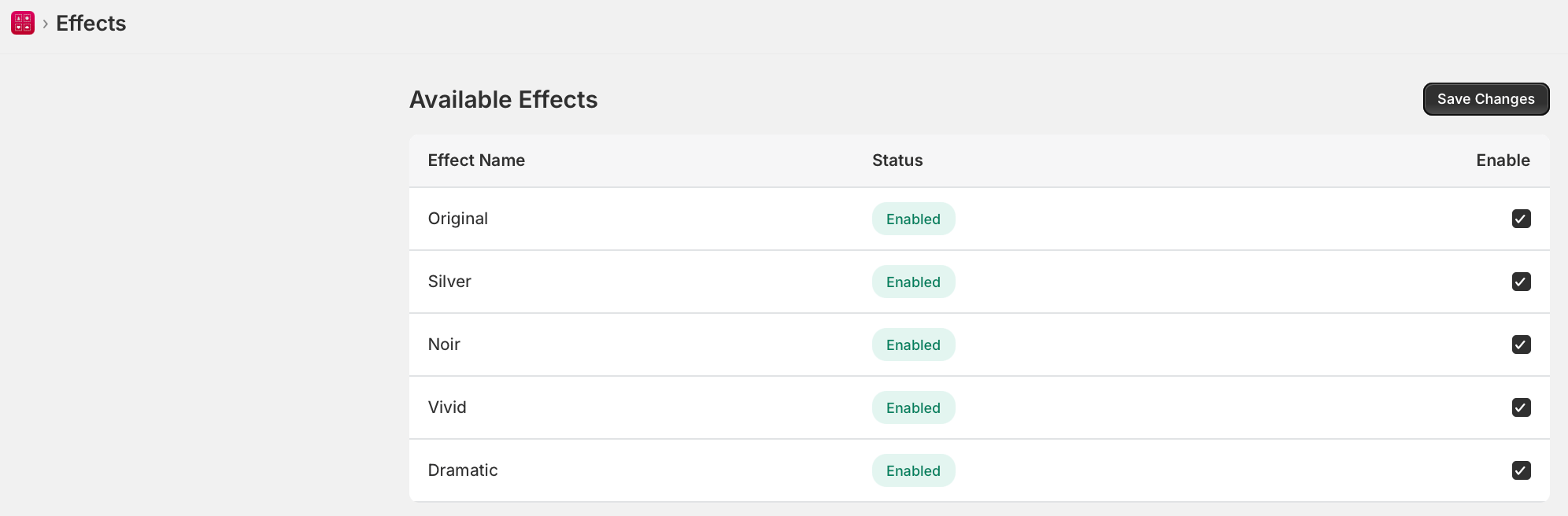 The **Effects** section lets you configure the photo effects and filters that customers can apply to their uploaded photos before framing. Effects include black & white, sepia, vintage, and other artistic filters.
## Available Effects
Photo Frame Customizer supports the following built-in photo effects:
* **None** — The original photo with no effect applied (default).
* **Black & White** — Converts the photo to greyscale.
* **Sepia** — Applies a warm brown tone for a vintage look.
* **Vintage** — Adds a faded, aged appearance with slightly muted colors.
* **Vivid** — Boosts color saturation for a more vibrant look.
* **Warm** — Adds warm yellow/orange tones.
* **Cool** — Adds cool blue tones.
## Configuring Effects
1. In Photo Frame Customizer, navigate to **Effects** in the sidebar.
2. Toggle each effect **On** or **Off** to control which effects customers can choose.
3. The effects you enable will appear as options in the customizer widget on your storefront.
4. Click **Save** to apply your changes.
## How Customers Use Effects
1. The customer opens the customizer on your product page and uploads a photo.
2. They select an **Effect** from the available options.
3. A real-time preview shows the effect applied to their photo within the chosen frame.
4. They add to cart with the selected effect saved to their order.
Effects are applied client-side in the browser as a preview. The final effect is saved and applied when the order is processed. Disabling unused effects keeps the customizer interface clean and focused.
The **Effects** section lets you configure the photo effects and filters that customers can apply to their uploaded photos before framing. Effects include black & white, sepia, vintage, and other artistic filters.
## Available Effects
Photo Frame Customizer supports the following built-in photo effects:
* **None** — The original photo with no effect applied (default).
* **Black & White** — Converts the photo to greyscale.
* **Sepia** — Applies a warm brown tone for a vintage look.
* **Vintage** — Adds a faded, aged appearance with slightly muted colors.
* **Vivid** — Boosts color saturation for a more vibrant look.
* **Warm** — Adds warm yellow/orange tones.
* **Cool** — Adds cool blue tones.
## Configuring Effects
1. In Photo Frame Customizer, navigate to **Effects** in the sidebar.
2. Toggle each effect **On** or **Off** to control which effects customers can choose.
3. The effects you enable will appear as options in the customizer widget on your storefront.
4. Click **Save** to apply your changes.
## How Customers Use Effects
1. The customer opens the customizer on your product page and uploads a photo.
2. They select an **Effect** from the available options.
3. A real-time preview shows the effect applied to their photo within the chosen frame.
4. They add to cart with the selected effect saved to their order.
Effects are applied client-side in the browser as a preview. The final effect is saved and applied when the order is processed. Disabling unused effects keeps the customizer interface clean and focused.